Your active watchlist carries across the symbol-level desks
One list for crypto spot, Hyperliquid and Lighter perps, US equities and selected world indices. Charts, heatmap, news, earnings and alerts all open on it. Key w.
AS OF 10 AUGUST 2026 · SOURCE: GAMBIT · CURRENT VALUES IN THE TERMINAL ↗
What this shows, and what it cannot
What this tells you
What the rest of the terminal organises around: your list turns a general feed into your research surface.
What it does not tell you
A name on the list is not a signal. The list is the universe to read events against; it makes nothing true.
What to inspect next
Which names report soon, the positioning around one, or an alert on a level you care about.
Curate once. Every desk reads it.
The watchlist is the input the other desks take. Add NVDA and BTC · spot, and:
- The newsfeed's WATCHLIST chip cuts the triaged tape to those names.
- The heatmap on h redraws around them.
- Alert rules run on Gambit's servers and reach Telegram with the browser closed.
- The earnings desk prices the expected move on whichever reports next.
Any market fits: crypto spot and perps on Hyperliquid and Lighter, US equities and world indices, on one connection under the same columns.
Why one list
A watchlist in Gambit is not a page you visit. It is the argument the other desks take, and the rotation and sentiment tabs become context for what you actually hold.
You maintain one set of names; the signal comes to them. The usual arrangement is the opposite: a news app, a charting tab and an alert tool each holding a private idea of what you care about, reconciled by hand every morning.
What goes in the list is deliberately unrestricted, all streaming under the same last, change and percent columns. BTC · spot sits directly beneath ORCL because to the terminal a row is a row.
What it looks like with something in it
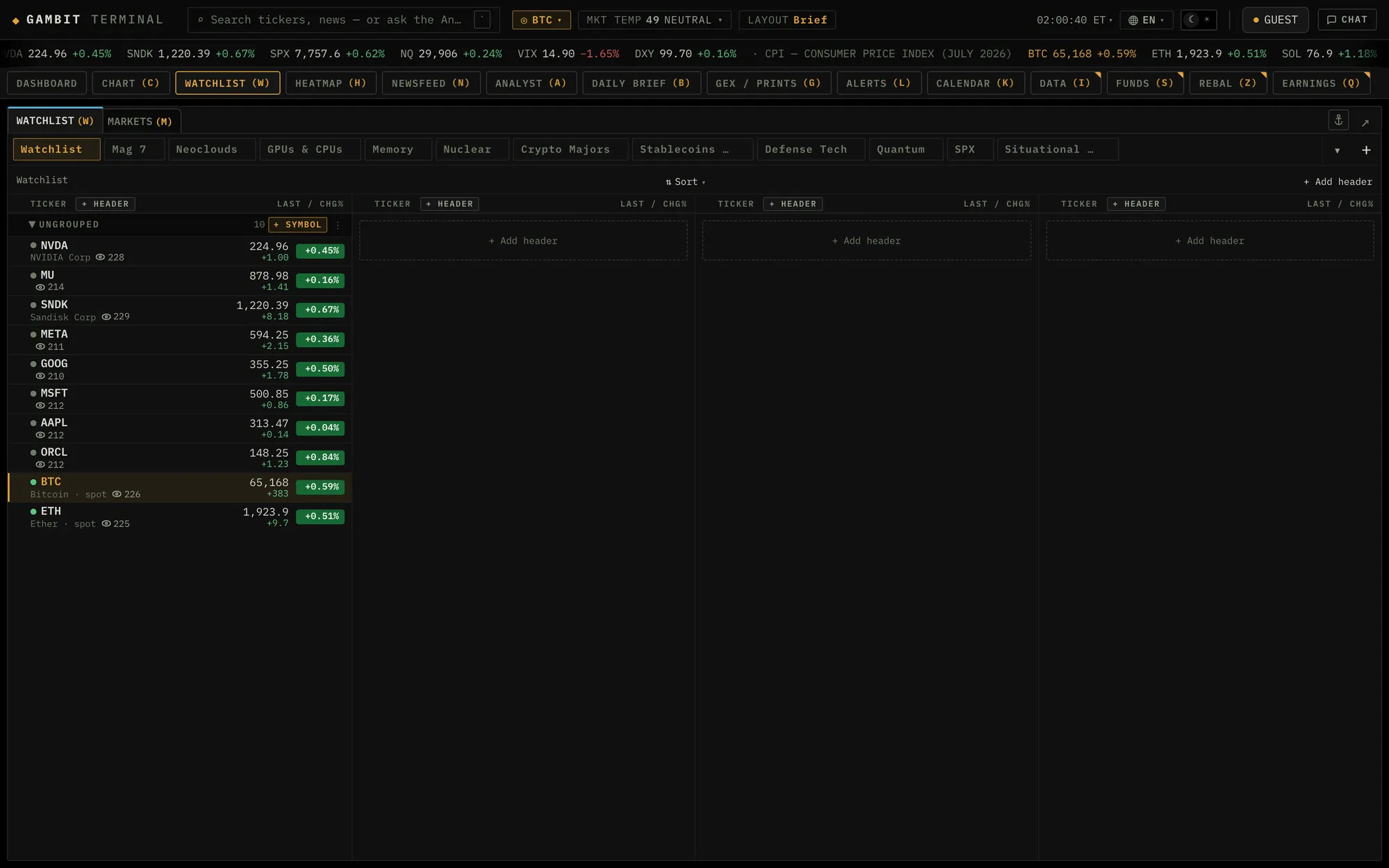
Saved themes run along the top: Mag 7, Neoclouds, Memory, Nuclear, Crypto Majors, Quantum and more. Group symbols under your own headers, across as many columns as fit.
The MARKETS tab is where you browse for names to add.
Why themes, not one basket
The saved lists also include GPUs & CPUs, Stablecoins and Defense Tech. The AI trade is not one basket, and pretending otherwise costs you the rotation between them.
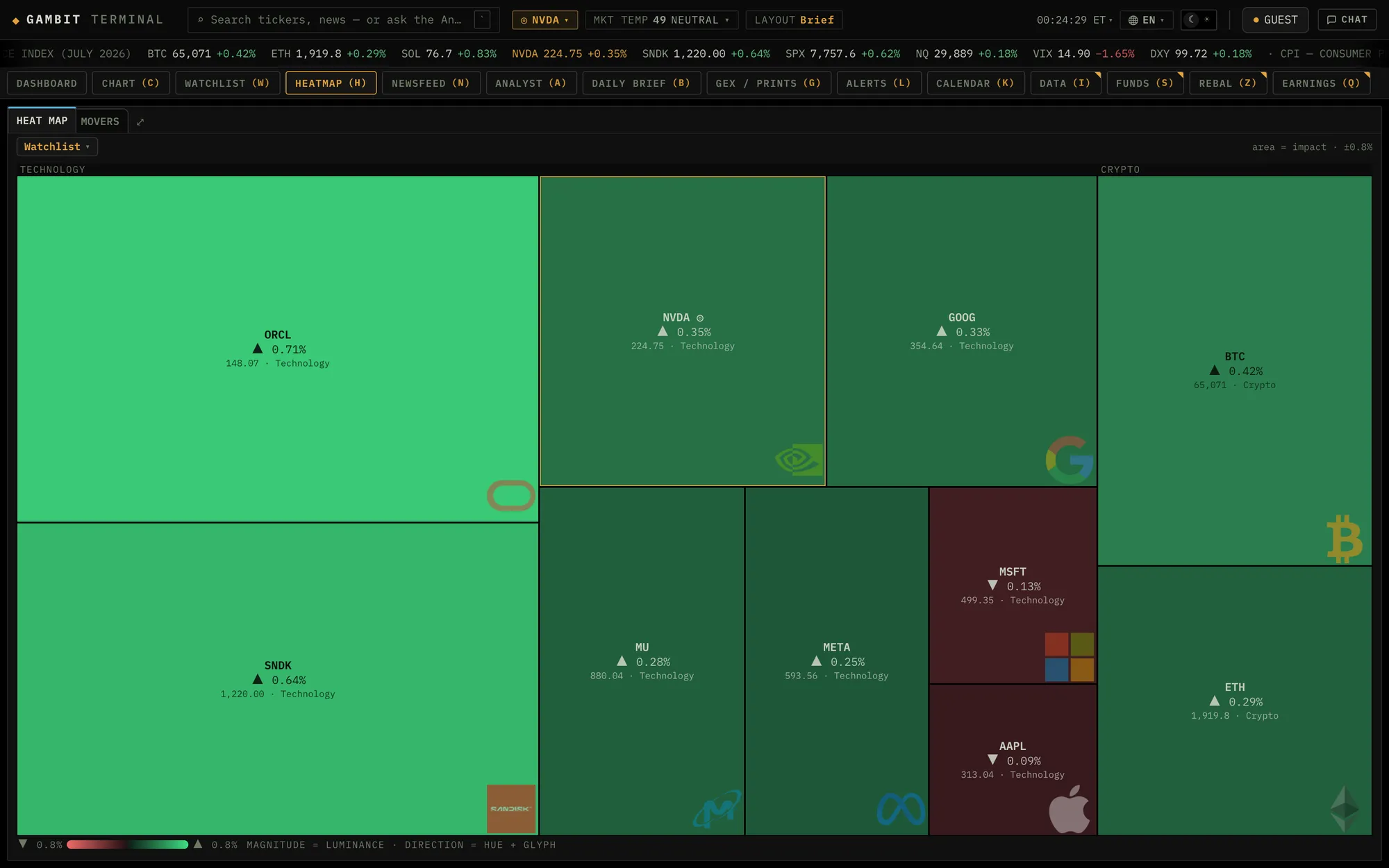
The heatmap renders your list, not an index
Press h to read the session in one glance. Area is impact, luminance is the size of the move, hue and a glyph show direction.
Crypto and equities sit side by side, which is where a divergence shows first.
Where the list goes, key by key
Each desk is one keystroke away, and each takes the same list.
| Key | Desk | What it does with your list |
|---|---|---|
| w | Watchlist | The list itself, in sections and columns, perps beside equities |
| h | Heatmap | The same list as one grid, sized by impact |
| c | Chart | Candles, indicators and drawings for the selected symbol |
| n | Newsfeed | Triaged headlines, filterable to your names |
| l | Alerts | Server-side rules on those symbols, sent to Telegram |
| ` | Search | Any ticker, any desk, by name |
Guest first, account when it buys something
Open the terminal as a guest and start adding symbols. Nothing on the streaming tape sits behind the login.
- GuestNo account. Watchlist, heatmap, charts, news, calendar and the DATA desk.
- EmailWatchlists that persist, alerts delivered to Telegram, a handle in the terminal chat.
- WalletThe trading surfaces, gated where they should be.
Questions
What does the rest of the terminal do with my watchlist?
It routes signal to it. The newsfeed's WATCHLIST chip narrows the triaged tape to your names, the heatmap draws them as one grid, alert rules run server-side to Telegram, and the earnings desk prices expected moves for those reporting.
Can I hold crypto and US stocks on one watchlist?
Yes. One list holds crypto spot, perps from venues including Hyperliquid and Lighter, US equities and selected world indices. Crypto and US equities stream live; some index quotes are exchange delayed by roughly 10 to 20 minutes, and marked.
Do I need an account to use the watchlist?
No. The terminal opens as a guest session with the full read surface, watchlist and heatmap included. Email sign-in makes lists persist across devices and turns on Telegram alerts; a wallet opens the trading surfaces.
Can I organise a watchlist into sections?
Yes. Symbols group under headers you name, and lists sit side by side in as many columns as fit. Saved lists cover themes such as Mag 7, Neoclouds, Memory, Nuclear, Crypto Majors, Stablecoins, Defense Tech, Quantum and SPX.
What does the heatmap show?
Your current watchlist as one grid: area is impact, luminance is the size of the move, hue and a glyph carry direction. Crypto and equities sit side by side, where a divergence shows up first.